
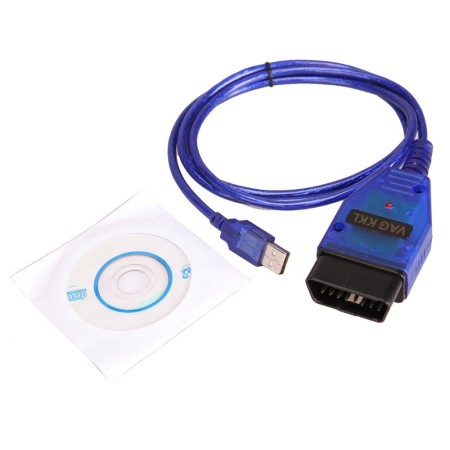


VAG COM 409.1 USB Para Diagnostico automotriz
Scanner Automotriz VAG COM409.1 con chipset CH340.
Caracteristicas:
- Funcion primaria: Cable de interface USB
- Conector OBDII: J1962 de 16 Pines macho (Va conectado al Vehiculo)
- Interface a USB incluida
- Sistemas operativos compatibles: Windows 98SE /ME /2000 /NT /XP /WIN7/8/10
- Soporta la comunicacion bus con las terminales (K) y (L) de ignicion para iniciar la ECU del vehiculo
- Soporta tres protocolos diferentes con el mismo conector OBDII, ISO/KWP, VPW y PMW
Software: VCDS-Lite Release 1.2
Existe mas software compatible, junto con versiones pagas con mayor funcionalidad
Especificaciones:
- Soporta el protocolo ISO9141
- No requiere de fuentes de alimentacion extra
- Marca VAG 409.1
- Chipset: CH340
- Voltaje de Operacion: 12v
- Dimensiones: 1cm x 30cm x 3cm
La compra incluye:
- 1 Escaner Automotriz VAG 409.1
- 1 CD de drivers
--------------------------------------------------------------------------------------------
INFORMACION PARA INSTALACION Y RESOLUCION DE PROBLEMAS CON DRIVERS
ESTA INFORMACION SE ENCUENTRA EN INGLES, pronto estara disponible en español
(DO NOT connect cable to your computer yet. Only do this when you're instructed below.)
Start by downloading the VAG-COM Driver Pack 1.
Here's how to install on different Windows versions...
Windows Vista, 7, 8, 8.1, 10:
Uncompress the file. Double-click on "Install.exe" to install the drivers. When complete — plug in cable into any USB port on your computer and wait for automatic installation to complete.
If install is successful, move onto Step 2.
If installation fails, see below: Troubleshooting: If Drivers Failed To Install
Windows XP:
- Uncompress the file. Double-click on "Install.exe" to install the drivers.
- Plug cable into any computer's USB port.
- "Found New Hardware Wizard" will start and it will ask you "Can Windows connect to Windows Update to search for the software?". Select "Yes".
- Select "Install the software automatically".
- After the installation is complete, click "Finish".
- "Found New Hardware Wizard" will start once again because there are two drivers for this cable.
- Go through the same steps as explained above to install this second driver.
If install is successful, move onto Step 2.
If installation fails, see below: Troubleshooting: If Drivers Failed To Install
Troubleshooting: If Drivers Failed To Install:


Go to Control Panel.
- Windows Vista/7/8/10: Control Panel » System » Device Manager
- Windows XP: Control Panel » System » "Hardware" tab » Device Manager
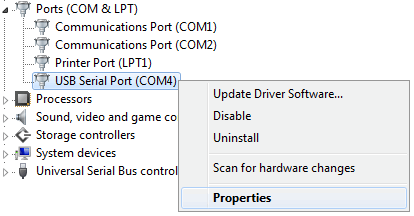
Expand "Other devices" or "Ports (COM & LPT)". Whichever contains "USB Serial Port".
Next to "USB Serial Port" — you'll see a number.
If the COM port number is between 1-4, then everything is fine. Move onto Step 3.
If the COM port number is above 4, then we'll have to change it so it's between 1-4. Here's how...
Right-click on "USB Serial Port" and click on "Properties" — as per below pic:
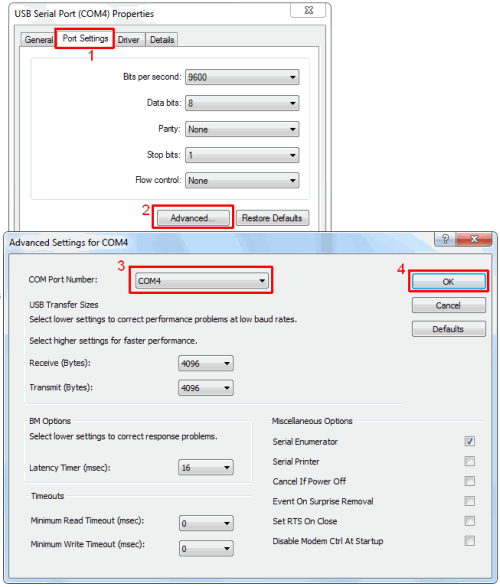
Then:
- Click: Port Settings
- Click: Advanced
- For "COM Port Number" — you MUST choose any number between 1-4.
That's it! Now let's test if everything is working. Move onto next step below...
Cable should be plugged into computer.
- Start VCDS-Lite software.
- Click "Options" button.
- You will see "Select COM Port" box. Select the "COM Port" number as explained in Step 2.
- Click the ‘Test’ button.
- If everything is good, it should display "Interface Status: Found!".
- You can now connect other end of cable to car. Turn on ignition. And you're ready to start diagnosing!
If test is not successful — check the following:
- Other software or devices using USB ports or that same COM Port could be conflicting. You should uninstall the suspected software or device for troubleshooting this problem.
- It should be noted that VAG-COM 409.1 KKL cable does not work on vehicles running on CAN-BUS System.
- Cable must be plugged into the vehicle with ignition ON.
- Test the cable with each COM Port from 1 to 4 in Windows Device Manager.
- Make sure that the driver is installed and configured as explained in Step 1.
- Only Audi, Volkswagen, Skoda and Seat vehicles are supported. Other brands will only work for generic OBD-II functions.
- If VAG-COM 409.1 KKL cable doesn't connect — or if you get the error message "Can't Synch Baud Rate" — then go to Options and set Start Baud to 9600. If 9600 doesn't work, try 4800 and 1200. Turn the vehicle's ignition OFF and back ON after each failed attempt to connect.
- If you have installed VCDS software before or from another source, uninstall all versions of VCDS software right now, and delete directory "C:Ross-Tech". Then install latest version of VCDS-Lite software by clicking here.
- Anchura
- 4.5cm
4.5cm - Profundidad
- 8cm
8cm - Sistema operativo
- Windows Vista, 7, 8, 8.1, 10
Windows Vista, 7, 8, 8.1, 10 - Altura
- 2.5cm
2.5cm
Se realizan envíos sin cargo a todo el territorio nacional, con excepción de aquellos productos voluminosos o de gran peso que, por sus características, no pueden ser despachados mediante motomensajería ni a través de Correo Argentino.
El envío sin cargo aplica exclusivamente para la modalidad de Correo Argentino con retiro en sucursal. Los envíos a domicilio por Correo Argentino podrán estar sujetos a cargos adicionales, según el destino y las dimensiones del producto.
En el caso de envíos mediante Vía Cargo, el servicio no es gratuito. El costo correspondiente deberá abonarse al momento de retirar la mercadería en la sucursal de destino.
Ante cualquier consulta, recomendamos comunicarse previamente para verificar condiciones y costos de envío según el producto seleccionado.
En Todomicro, nos comprometemos a brindar transparencia y seguridad en cada operación. A continuación, se detallan las condiciones aplicables a cambios y devoluciones.
Compras realizadas de manera presencial en el local comercial.
Para compras efectuadas físicamente en nuestro local comercial, cuando el producto cumpla con todas las especificaciones publicitadas y no presente fallas de funcionamiento:
-
Se aceptarán devoluciones dentro de los 3 (tres) días hábiles contados desde la fecha de compra.
-
No se aceptarán devoluciones una vez vencido dicho plazo.
Plazo para cambios
Todomicro ofrece un plazo comercial de hasta 30 (treinta) días corridos desde la fecha de compra para realizar cambios, bajo las siguientes condiciones:
-
El producto deberá conservar todos sus accesorios originales.
-
Deberá incluir su empaque original en buen estado.
-
No deberá presentar señales de uso, desgaste o daños.
En estos casos (cuando no se trate de derecho de arrepentimiento ni de falla de producto), la empresa podrá aplicar un cargo administrativo o de restocking de hasta el 15%, el cual será informado previamente.
Los productos podrán cambiarse por cualquier otro producto que esté a la venta en www.todomicro.com.ar al precio de lista, sin poder aplicar para el cambio ninguna promoción u oferta vigente. También podrá dejar el producto a cambio de una nota de crédito para ser utilizada la misma de forma posterior.
Todo costo de traslado estará a cargo de la parte compradora.
Verificación técnica
Las pruebas necesarias para verificar el correcto funcionamiento de los productos serán realizadas con instrumental propio de la empresa.
En caso de que el comprador solicite pruebas adicionales utilizando dispositivos de su propiedad que no hayan sido adquiridos en este comercio:
- Dichas pruebas serán cotizadas de manera particular.
- Tendrán un costo mínimo de $5.500.
- Su realización quedará sujeta a la disponibilidad técnica y al criterio exclusivo del vendedor.

feedback Reportar comentario